Showing posts with label Tutorials. Show all posts

Photoshop Breast Enhancement

Tuesday, May 18, 2010 35 comments


Enlarging and enhancing breasts in Photoshop

34 Essential Tutorials To Get Started With Digital

Tuesday, May 4, 2010 2 comments


Here’s a compilation of the best photography tips and tutorials found on the web. Starting with basics to make your first purchase, all the way to the inner workings of your camera.
Reblog this post [with Zemanta]

Photoshop’s Pen Tool: The Comprehensive Guide

Monday, May 3, 2010 0 comments


An outstanding tutorial from PSDTUTS.com

The Pen Tool makes appearances across almost the entire Adobe product range. Its function and behavior varies depending on the application, but by mastering it youll find you work quicker, smoother and with better results. This guide will give you a comprehensive basis for working with the Pen Tool in Photoshop.


Reblog this post [with Zemanta]

Visual Paths

Wednesday, April 21, 2010 0 comments


Help the viewer's eye move through your image by paying attention to visual paths.

If we put too much randomly-placed visual information into an image, our audience doesn’t know where to look. The eye wanders about the image, and eventually falls off the edge without being really engaged. What we need to do is guide the viewers’ eye by placing visual paths of interest in our art. Unless you’re specifically aware of, and looking for visual paths you might not even be aware they’re there. But they’re often the hidden reason we “get” some images and not others.

Photoshop Fun Making an Eyeball

Monday, April 19, 2010 0 comments


Eyeball, Color Pupil and Iris
Reblog this post [with Zemanta]

3 ways to sepia tint a photo in Photoshop

Monday, April 12, 2010 0 comments


I want to show you 3 ways to sepia tint an old black and white photo in PhotoShop.
Reblog this post [with Zemanta]

HTML

Monday, March 16, 2009 0 comments
HTML Goodies intended purpose is to help new and growing website developers learn their trade, and to provide them with tips, guides and reference sets for their use as they become more accomplished. To that end, we have arranged the site into sections that range from a completely non-technical introduction to the concepts involved in developing websites all the way through to keyword references. The following is an overview of these various sections.

HTML Code Tutorial
Welcome to the HTML Code Tutorial. Our goal is to provide the most helpful and complete guide to creating web pages anywhere. If you're just beginning, start learning HTML here.

Effortless Reflections

Monday, February 2, 2009 0 comments


Create a Reflection in 5 K.I.S.S. Steps

If there is one thing I have learned in my years as a graphic designer, it’s that I need to keep things simple. I always try to keep in mind the old adage, K.I.S.S. (keep it simple silly). Now, I’m aware that normally the word “silly” is replaced by “stupid,” but the word “stupid” is not a very positive thing to be repeating to yourself each day. Try it Now>>
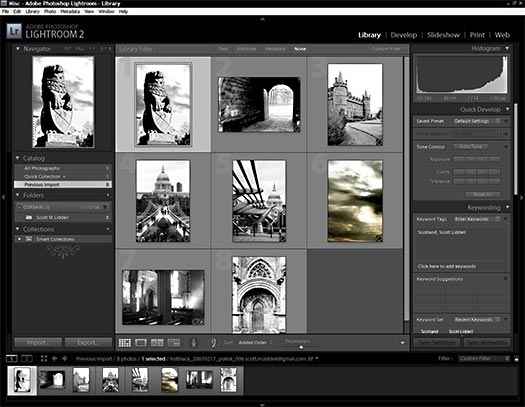
Forensic Lightroom 2 Tutorial - Importing Photos Into Photoshop Lightroom 2

Wednesday, September 3, 2008 0 comments
Importing Images Into Photoshop Lightroom 2

We'll start the discussion on importing images into Lightroom 2 by looking at those images that were captured by another device and already exist on our system (internal or external storage device). Select File>New Catalog to start with a fresh catalog. When we do, Lightroom will relaunch and you'll see a screen that looks like this - an empty catalog viewed in the Library Module. Try it Now>>>

Forensic Lightroom 2 Tutorial - Importing Photos Into Photoshop Lightroom 2
Reblog this post [with Zemanta]

Backing Up And Resetting Your Photoshop Preference Files

0 comments
Backing up your Photoshop preference files
How many of us use a dedicated back-up software or software/hardware combination? I think that the percentages are quite small. Most save their important files to an external hard drive and hope for the best.

In choosing what's important enough to send to your hard drive, do you include your Photoshop preference file? Try It Out>>>
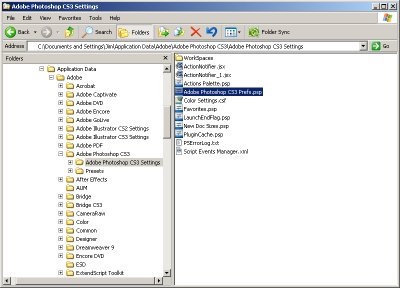
Backing Up And Resetting Your Photoshop Preference Files

Reblog this post [with Zemanta]

Photoshop Fundamentals: Create a Blueprint Effect

0 comments
The Photoshop Fundamentals: Create a Blueprint Effect tutorial leads you through the process of giving your images a striking blueprint effect. Try Now>>>

Photoshop Toning Techniques

0 comments
In Photoshop Toning Techniques, Leslie Alsheimer shows how to emulate the toning of traditional processes as well as utilize a new spectrum of creative toning possibilities. Try Now>>>


Tomorrow's CSS Today: 8 Techniques They Don't Want You To Know

Sunday, April 13, 2008 0 comments


With all the hype over new and upcoming browser support for advanced CSS features, developers can be confused about the CSS they can include in web projects today. Many of the more advanced features aren't widely supported by the dominant browsers, but some very useful ones are -- including newer features from CSS3.

View the Tutorial

Photoshop Fundamentals: Using the Color Halftone Filter

Tuesday, March 18, 2008 0 comments


This effect features one of Photoshop’s Pixelate filters—Color Halftone. The Pixelate filters clearly define a selection by grouping or clumping pixels of similar color values in cells. The Color Halftone filter simulates the effect of using an enlarged halftone screen on each channel of the image. It surrounds the image with technodots. You’ll also use two other filters to create our 'halo' effect—a Blur filter and a Distort filter. The Gaussian Blur filter adds low-frequency detail and produces a hazy look. The Twirl filter rotates a selection more sharply in the center than at the edges. View Graphics.com
Related Posts Plugin for WordPress, Blogger...