Showing posts with label Adobe Illustrator. Show all posts

How to Make a Door Paneling Effect in Adobe Illustrator

Friday, April 16, 2010 0 comments
The vector graphics software package Adobe Illustrator does not have a wood grain effect to make door paneling in one step. However, you can use Adobe Illustrator's shape, fill and pencil tools to create your own door paneling effect and use a clipping mask to transfer the effect to other objects. The benefit of creating the door paneling effect in Illustrator is that the object with this effect can be resized and stretched and still retain its sharpness, because it is a vector graphic.
Reblog this post [with Zemanta]

Let Global Color Rock Your World

Wednesday, February 17, 2010 0 comments

Global Color is a very handy feature in Illustrator that makes quick work out of editing color in an illustration. It also helps you keep your file organized, and makes it easier for the buyer to use and edit.

There are two main advantages to Global Colors: The ability to create tints, and the ability to change the color and update the illustration automatically.
Reblog this post [with Zemanta]

How to Create a 3D Text Photo Manipulation

Monday, January 25, 2010 0 comments

In this intermediate-level graphic design tutorial, you’ll learn how to realistically superimpose a beautiful three-dimensional text object onto a living room scene with the help of Illustrator and Photoshop.
Reblog this post [with Zemanta]

Creating Grunge Effects in Illustrator

Monday, February 16, 2009 0 comments


One of the more popular design elements these days isn’t an element at all, it is really destroying the elements you already have in your design! Simply put, grunge.

We have all seen many tutorials on creating grunge elements and grunge brushes in Photoshop, but I would like to show you that it is just as easy to apply grunge elements to your vector art work in Illustrator. Try it Now>>

Reblog this post [with Zemanta]

Effortless Reflections

Monday, February 2, 2009 0 comments


Create a Reflection in 5 K.I.S.S. Steps

If there is one thing I have learned in my years as a graphic designer, it’s that I need to keep things simple. I always try to keep in mind the old adage, K.I.S.S. (keep it simple silly). Now, I’m aware that normally the word “silly” is replaced by “stupid,” but the word “stupid” is not a very positive thing to be repeating to yourself each day. Try it Now>>

Creating a Vector Face in Illustrator

Monday, January 26, 2009 0 comments


Let’s take the mystery out of creating a vector face using Illustrator. Although there is no single way of doing it, I will guide you step-by-step from sketch to the finished illustration using the magnificent Pen Tool. No reference photos will be needed, just your vivid imagination and drawing skills combined with a basic knowledge of Adobe Illustrator. Try it Now>>
Reblog this post [with Zemanta]

Mastering Opacity Masks in Illustrator

Monday, January 19, 2009 0 comments

In Part 1 of Behind the Mask, we examined how to make masks in Adobe Illustrator. While masking presents a variety of uses, there is still one aspect I have not yet addressed. There's a little something called an opacity mask. Many designers may have never heard of it. Try it Now>>
Reblog this post [with Zemanta]

Mastering Clipping Masks in Illustrator

Thursday, January 15, 2009 0 comments

One of the more beautiful things about being a designer is the seemingly never-ending thirst for knowledge that permeates throughout the industry. I, for one, absolutely love learning new things that can help me creatively, or can help streamline the production process. However, there has been the odd time I've come across people who don't understand the finer workings of applications or, oddly enough, are afraid of them. In the name of progress, let's see if we can knock a major - and absolutely essential - function of Adobe Illustrator off the list of things to fear: Making a clipping mask. Try it Now>>
Reblog this post [with Zemanta]

Creating Envelopes in Adobe Illustrator

Thursday, December 18, 2008 0 comments


If there is one thing I really love about Adobe Illustrator, it has to be reshaping objects with an “envelope.” Real envelopes are pretty boring things -- you can only use them for mailing letters. But in this tutorial, you'll discover just how powerful and versatile Adobe Illustrator’s “Envelope Distort” is for reshaping almost anything. Yes, anything -- it's amazing! You'll be stuffing envelopes all day long, because the first thing to remember is whatever you put inside an envelope, you will be able to distort. This includes raster graphics, objects drawn with the pencil and brush tools, paths, gradient meshes and even unexpanded text, linear gradients and objects that have had 3D effects applied to them. It is really a powerful tool, so let's dive in and get started by creating the envelope.

Try Now>>

Reblog this post [with Zemanta]

Paste by remembering layers in Illustrator

Monday, September 8, 2008 0 comments

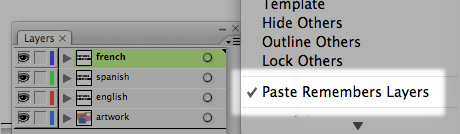
paste remember layers option

If you work with files that have a common base and several custom layers for languages or other mutations, you should always remember to switch on the Paste Remember Layers option in Illustrator. You will find this option by clicking the little contextual menu icon in the top right corner of the layers pane. Try it Out>>>

Reblog this post [with Zemanta]

Set your Illustrator tools to grey

Thursday, September 4, 2008 0 comments

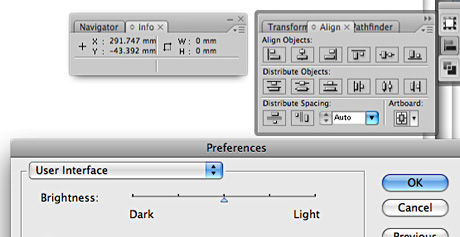
grey interface

When you work with Illustrator documents your document's background is mostly white. The interface of the application, such as the panes and the toolbox are also white by default. This puts some strain on your eyes and brain when you're trying to identify each area. To relieve this extra effort you may want to experiment changing the background of the user interface to a shade of grey instead of white. Try it Out >>>

Reblog this post [with Zemanta]
Related Posts Plugin for WordPress, Blogger...